Pre-Kindergarten Information

Pre-Kindergarten Information

Thursday 29 January 2026 – Welcome Day

All Pre-K students are very welcome to drop in on Thursday 29 January in casual clothes to see their classroom, enjoy their new playground and meet their teacher, at a time convenient for your family between 2.00pm and 3.00pm.

The invitation is extended to all Pre-K students, no matter the days they will normally attend, and is entirely optional.

Friday 30 January 2026 – First Day of Classes

Term 1 commences on Friday 30 January at 8.45am.

For Pre-K this means those students who attend 5 days and those who attend Wednesday – Friday will be at School. For those attending Monday – Wednesday, they will commence on Monday 2 February.

Students are to wear full Pre-K Summer Uniform. Pre-K students should go directly to their classroom. Parents can kiss and drop after their child has settled. Please be reassured our staff will be present to support.

If you have any questions, please reach out to the College on office@oxley.nsw.edu.au or call on 4861 1366 and we will be able to help.

Morning Drop Off

There is a teacher on duty at 8.20am each morning for student supervision. Pre-K students are supervised outside in their play area from 8.20am. Classrooms are not open until 8.40am to allow teachers to prepare for the day and attend meetings. Students should not be dropped off before 8.20am as there is no supervision provided.

Traffic Management Plan

Two family name signs will be issued on Friday 30 January via your eldest child. One of these will need to be visible on the passenger sun visor when you arrive each day at the campus for pick up. Should you require additional signs, please email studentservices@oxley.nsw.edu.au Please do not arrive in the Junior School Turning Circle before your allocated time.

Pre-K: pick up time is 3.00pm

Kindergarten to Year 2: pick up time is 3.05pm

Year 3 to Year 6: pick up time is 3.15pm

Parents & Carers will be asked to move around if their child is not ready to be picked up so arriving a few minutes later is often the best practice. Detailed information on the Traffic Management Plan can be found by following this link: Oxley College Traffic Management Plan

Please read this carefully to ensure you are up to date with pick up arrangements.

Student Wellbeing

Please ensure your child has their hat and a drink bottle each day as these are the basic essentials required, especially for a hot start to the term. Unfortunately, due to health and hygiene reasons we are not able to provide any spares for lost or missing hats. Please remember that if a student does not have their hat at recess or lunch, they will need to remain under cover. 

Student Services For P-6 / School Nurse

The Elvo building, which is the white building where our P-12 College Reception is located, also houses Student Services P-12 and the Clinic. If your child is late to school, you need an early pick up or you need further information, please contact Student Services via student.services@oxley.nsw.edu.au.

You are welcome to access Student Services and The Clinic during the school day via the second driveway.

Recess and Lunch

Our students have a Fruit Break around 10.00am each morning. For fruit break we encourage families to pack either fruit or vegetable snacks. Recess is at 10.51am and lunch is at 1.06pm. As we are a nut aware school, please avoid all nut products (including peanut butter and Nutella) due to students with anaphylactic reactions. For safety reasons, students are not encouraged to share food.

Canteen 

A reminder to update your child’s class on the Flexischools website or App. Pre K students are able to order from the Canteen and their lunch orders will be delivered to the classroom.

www.flexischools.com.au

After School Care

Our After School Care service is situated in the grounds of Oxley College. They are open Monday to  Friday during school terms from 3.15pm until 6.00pm. 

Website: CareBookings – Home          Booking Code: UCDRS

If you require any additional information, please email: afterschoolcare@oxley.nsw.edu.au.

 The After School Care phone number is 02 4862 7773

P-12 Parent Contact List

Each year we distribute a Parent Contact List. This list includes names, mobile phone numbers and email addresses. If you do not wish to include your details in this Parent Contact List, please contact Alex Stone on 4861 1366 or office@oxley.nsw.edu.au by Friday 6 February. We would like to distribute this list as soon as possible. We will only distribute your child’s year group contact list. 

Important Note: The Parent Contact list is not to be used for marketing or publicity purposes. This is a list only to be used within the Oxley community. (Please select BCC when emailing a group.) It is a serious breach of confidentiality if a parent uses it for their own business distribution.  

Junior School Information

Junior School Information

Thursday 29 January 2026 – Welcome Day

All Junior School students are very welcome to drop in on Thursday 30 January, in casual clothes, to see their classroom and meet their teacher, at a time convenient for your family between 2.00pm and 3.00pm.

Friday 30 January 2026 – First Day of Classes

Term 1 classes commence on Friday 30 January at 8.45am.

Students are to wear their full Junior School Summer Uniform.

Lunches can be ordered from the Canteen from the first day of school through the Flexischools App.

Local school buses commence Friday 30 January 2026.

If you have any questions, please reach out to the College via office@oxley.nsw.edu.au or call on 4861 1366 and we will be able to help.

First Day Arrival for New Families

We ask that our new Year 1-6 families meet outside Junior School Office on Friday 30 January at 8.35am where teachers will come and collect new students to settle them in at their new rooms. Kindergarten and Pre-K students should go directly to their classroom areas. Parents can kiss and drop after your child has settled. Please be reassured our staff will be present to support.

Morning Drop Off

There is a teacher on duty at 8.20am each morning for student supervision. Pre-K students are supervised outside in their play area from 8.20am. Classrooms are not open until 8.40am to allow teachers to prepare for the day and attend meetings. Students should not be dropped off before 8.20am as there is no supervision provided.

Traffic Management Plan

Two family name signs will be issued on Friday 30 January via your eldest child. One of these will need to be visible on the passenger sun visor when you arrive each day at the campus for pick up. Should you require additional signs, please email studentservices@oxley.nsw.edu.au. Please do not arrive in the Junior School Turning Circle before your allocated time.

Pre-K: pick up time is 3.00pm

Kindergarten to Year 2: pick up time is 3.05pm

Year 3 to Year 6: pick up time is 3.15pm

Parents & Carers will be asked to move around if their child is not ready to be picked up so arriving a few minutes later is often the best practice. More information on the Traffic Management Plan can be found by following this link: Oxley College Traffic Management Plan

Please read this carefully to ensure you are up to date with pick up arrangements.

School Photos

Junior School Photos will occur Monday 2 February. Please ensure students wear full summer uniform and tidy hair as per details below.  School Photos must be ordered through Advanced Life prior to the photo day.  Please go to www.advancedlife.com.au and enter the code 86P AZG PJ9. Sibling photos will be taken during lunch breaks on Monday 2 and Tuesday 3 February depending on student availability.

Sports Uniform

Junior School students will be advised in Week 1 what day they should wear their sports uniform.

Student Wellbeing

Please ensure your child has their hat and a drink bottle each day as these are the basic essentials required, especially for a hot start to the term. Unfortunately, due to health and hygiene reasons we are not able to provide any spares for lost or missing hats. Please remember that if a student does not have their hat at recess or lunch, they will need to remain under cover. 

Student Services For P-6 / School Nurse

The Elvo building, which is the white building where our P-12 College Reception is located, also houses Student Services P-12 and the Clinic. If your child is late to school, you need an early pick up or you need further information, please contact Student Services via student.services@oxley.nsw.edu.au

You are welcome to access Student Services and The Clinic during the school day via the second driveway.

Summer Uniform

Boys Options
  • Long or short sleeve chambray shirts.
  • Long or short Oxley specific grey socks.
Girls Options
  • Summer tunic with white Oxley specific socks.

or

  • Girls tailored grey shorts, banded short sleeve chambray blouse, tie, short grey Oxley specific socks.

Girls choosing the shorts option will need to wear the uniform as a whole (that is, blouse and correct grey socks) as opposed to white socks/ long sleeve shirt. 

Hair / Jewellery

Hair needs to be neat and tidy and off the face. Boys with hair below their collar will need to put it into a tidy ponytail. Girls with hair below their collar need to have their hair up in a ponytail or plaits. They are only to use blue, yellow, or white ribbon. Jewellery for girls is a gold or silver sleeper or stud, no coloured stones, no necklaces, bracelets, rings or anklets unless it is a bracelet required due to illness or allergy. Both boys and girls can wear a watch.

Library Bags 

All students in the Junior School will need an Oxley library bag in order to borrow books from the library. These can be purchased from the uniform shop. Please ensure the library bag is clearly labelled. 

Recess and Lunch

Our students have a Fruit Break around 10.00am each morning. For fruit break we encourage families to pack either fruit or vegetable snacks. Recess is at 10.51am and lunch is at 1.06pm. As we are a nut aware school, please avoid all nut products (including peanut butter and Nutella) due to students with anaphylactic reactions. For safety reasons, students are not encouraged to share food.

Canteen 

A reminder to update your child’s class on the Flexischools website or App. Pre K students are able to order from the Canteen and their lunch orders will be delivered to the classroom.

www.flexischools.com.au

After School Care

Our After School Care service is situated in the grounds of Oxley College. They are open Monday to Friday during school terms from 3.15pm until 6.00pm. 

Website: TheirCare | Where Kids Love To Be

If you require any additional information, please email: afterschoolcare@oxley.nsw.edu.au.  The After School Care phone number is 02 4862 7773

Co-Curricular Clubs 

The clubs for Semester 1 are currently being organised and information will be sent out as soon as they have been confirmed, along with information on when and how to sign up. Please remember these clubs are filled on a first come, first served basis.

Junior School Assembly 

Our Assemblies take place on Tuesday mornings at 9.00am in the Peter Craig Centre (PCC). These will begin in Week 4 (Tuesday 17 February) and families are welcome to attend. At our Assembly we celebrate our student awards and share musical performances and student achievements in sport and other activities.

 P-12 Parent Contact List

Each year we distribute a Parent Contact List. This list includes names, mobile phone numbers and email addresses. If you do not wish to include your details in this Parent Contact List, please contact Alex Stone on 4861 1366 or office@oxley.nsw.edu.au by Friday 6 February. We would like to distribute this list as soon as possible. We will only distribute your child’s year group contact list. 

Important Note: The Parent Contact list is not to be used for marketing or publicity purposes. This is a list only to be used within the Oxley community. (Please select BCC when emailing a group.) It is a serious breach of confidentiality if a parent uses it for their own business distribution.  

Please contact the College if you have any questions via email office@oxley.nsw.edu.au or 4861 1366.

Senior School Information

Senior School Information

Thursday 29 January 2026 – Welcome Day

We look forward to welcoming all new Senior School Students and all of Year 7 and 11 only on this day. Please note that Berrima Buslines are not operating school buses on this day.

All students (including those who are new to Oxley in 2026) will have the opportunity to take part in a Meet the Mentor Session via MS Teams on Thursday 29 January to discuss aspirations and goals for the year ahead. It will be beneficial for returning students to review their previous school report in preparation for the session.

Details will be sent to families via email.

Welcome Day Schedule:

Year 7

8.45am: All students should gather in their House groups on Founders Field in front of the Peter Craig Centre (PCC). Please wear full summer uniform.

The students will spend time in their Houses, have an IT induction session and learn about Oxley life with Ms Whiteley.

2.30pm: Students are to be collected from the Junior School Turning Circle (first driveway). Please note that Berrima Buslines are not operating school buses on this day.

Students should bring:

BYOD laptops: It is important that your child is the administrator of the device and knows all passwords to access the settings.

School Managed Laptops: These will be available for collection at the Student Onboarding session.

Recess, Lunch and water bottle (the Oxley Canteen will be open for orders with a limited menu which is accessible through Flexischools)

Pencil case, books etc.

New Students in Years 8-10

8.30am: Arrival and meet on Founders Field (in front of the Peter Craig Centre). Please wear full summer uniform and bring laptops.

BYOD laptops: It is important that your child is the administrator of the device and knows all passwords to access the settings.

School Managed Laptops: These will be available for collection at the Student Onboarding session.

Students will be involved in House induction, IT induction and a school tour.

10.00am: Parents to collect students from the Senior School Pick Up Zone (second driveway). Please note that Berrima Buslines will not be operating school buses on this day.

New students in Year 11

8.30am: Arrival and meet on Founders Field in front of the Peter Craig Centre. Please wear full summer uniform.

Students will be involved in House induction, IT induction and a school tour.

10.00am: Join the rest of the Year 11 Year Group for Burn Bright.

12.40pm: Parents to collect students from the Senior School Pick Up Zone (second driveway). Please note that Berrima Buslines will not be operating school buses on this day.

Students should bring:

BYOD laptops: It is important that your child is the administrator of the device and knows all passwords to access the settings.

School Managed Laptops: These will be available for collection at the Student Onboarding session.

Recess and water bottle (the Oxley Canteen will be open for orders with a limited menu accessible through Flexischools).

Pencil case, books etc.

Year 11 Students

8.45am: Arrival and meet in the PCC. Please wear full summer uniform. Students will attend the Burn Bright sessions with a break for Recess. The Burn Bright program aims to support the students transition to Stage 6 and the HSC.

12.40pm: Parents to collect students from the Senior School Pick Up Zone. Please note that Berrima Buslines will not be operating school buses on this day.

Students should bring:

Recess and water bottle (the Oxley Canteen will be open for orders)

Pencil case, books etc.

Year 11 students will leave the Burn Bright sessions for 10 minutes to complete their Meet The Mentor appointments. Families will be emailed with their times.

Friday 30 January 2026 – First Day of Classes

Term 1 classes commence on Friday 30 January at 8.45am. Students will have a whole school assembly and spend time in Mentor Groups before timetabled classes from Period 3 onwards. Students are to wear full Senior School summer uniform.

Lunches can be ordered from the Canteen using the Flexi-Schools app.

Local school buses commence Friday 30 January 2026.

If you have any questions, please reach out to the College via office@oxley.nsw.edu.au or call on 4861 1366 and we will be able to help.

School Photos

Senior School photos will occur Tuesday 3 February. Please ensure students wear full summer uniform and have tidy hair.  School photos must be ordered through Advanced Life prior to the photo day.  Please go to www.advancedlife.com.au and enter the code 86P AZG PJ9. Family photos will take place during lunch breaks on both Monday 2 and Tuesday 3 February, depending on student availability.

Traffic Management Plan

Two family name signs will be issued on Friday 30 January via your eldest child. One of these will need to be visible on the passenger sun visor when you arrive each day at the campus for pick up. Should you require additional signs, please email studentservices@oxley.nsw.edu.au. Please do not arrive in the Junior School Turning Circle (Years 7 & 8) or Senior School Drop Zone (Years 9 – 12) before 3.25pm. The pick up location is dependent on your oldest child. Parents & carers will be asked to move around if their child is not ready to be picked up so arriving a few minutes later is often the best practice. Detailed information on the Traffic Management Plan can be found by following this link: Oxley College Traffic Management Plan 2025

Uniform

The start of the school year is an opportunity to re-establish standards and expectations regarding uniform and appearance. Uniform rules can be found in the Student Diary. Whilst uniform rules remain unchanged, I would like to draw your attention to particular elements:

Hair: Must be clean, neat and groomed. If long, it must be tied back and out of the face [please note: mullets are not permitted – students attending school with a mullet will likely be sent home on day one]. Hair colour should be natural and not be a significant change from previously.

Students must be clean shaven.

Earrings: Girls are permitted to wear only one sleeper or plain stud in each earlobe. All other piercings must be removed.

Skirts/dresses: Hems must be to the knee. These may need to be adjusted at the beginning of the school year.

Socks: Boys must wear their socks up. They should be of sufficient length to be folded to just below the knee.

Blazers: Students must wear (or carry, if hot) their blazer to/from school, when on public transport and when in town. They should have their blazer at school every day.

PE Uniform: should be worn correctly and not mixed with forms of College uniform.

Students attending Saturday sport matches who are not playing must wear school or PE uniform. Students have the option to wear sports uniform on Thursdays. Students are to arrive at school on all other days in full school uniform, unless they have a practical PE lesson in Period 1.

Student Timetables

All students can access their timetable via a link to EDVAL. The students will be emailed a web code to their school email address which will allow them to access the 2026 timetable. The timetable is still being finalised and there may be minor changes in Week 1 as necessary.

Year 7 Orientation Camp

Year 7 Orientation Camp will be on Thursday 5 February – Friday 6 February. Further details will be sent to Year 7 Parents and those whose Year 12 student leaders are involved.

Canteen

Over the counter sales are available at the Canteen. However, please note that:

• There are no cash transactions available at the canteen.

• Orders for recess and lunch can still be placed via Flexischools, the over-the-counter option is for students who may have forgotten their recess/lunch or are still hungry!

• Students are to use their student cards which will be scanned for payment and if they do not have one, they will be directed to Student Services to obtain a replacement.

P-12 Parent Contact List

Each year we distribute a Parent Contact List. This list includes names, mobile phone numbers and email addresses. If you do not wish to include your details in this Parent Contact List, please contact Alex Stone on 4861 1366 or office@oxley.nsw.edu.au by Friday 6 February. We would like to distribute this list as soon as possible. We will only distribute your child’s year group contact list. 

Important Note: The Parent Contact list is not to be used for marketing or publicity purposes. This is a list only to be used within the Oxley community. (Please select BCC when emailing a group.) It is a serious breach of confidentiality if a parent uses it for their own business distribution.  

Please feel free to contact the College Reception on 48 611 366 if you have any questions.

Stationary & Textbooks

Stationary & Textbooks

Junior School students do not need to purchase stationery as this is provided by the school.  Senior School students can access 2026 textbook requirements from the following webpage:

Texts and Stationery | Oxley College

Parent Information Sessions

Parent Information Sessions

Parent Information Sessions for each year group will be held in Week 2 per the timetable below.

These sessions are an opportunity to gain valuable information about the year ahead.

DateTimeYearRooms
Monday 2 February4.00pm – 4.45pmKindergartenJNR 03
Tuesday 3 February3.30pm – 4.15pmYear 1JNR 08
4.15pm – 5.00pmYear 2JNR 05
5.00pm – 6.00pmYear 7CTW 6 & 7
6.15pm – 8.15pmYear 11CTW 6 & 7
Wednesday 4 February3.30pm – 4.15pmYear 3CTW 02
4.15pm – 5.00pmYear 4PIN 01
5.00pmYear 9 CTW 6 & 7
6.00pmDuke of Edinburgh’s Award Information SessionCTW 6 & 7
Thursday 5 February3.45pm – 4.30pmYear 5GTW 06
4.30pm – 5.15pmYear 6GTW 04
  • Please note that Pre-K families will have a meeting with Ms Kelly Lees once the children have settled in.
  • Year 8, 10 and 12 do not have a Parent Information Evening as they are continuing on within the same Stage.

You are warmly invited…

You are warmly invited…

We are delighted to invite you to the Oxley College Welcome Drinks, a long‑standing and much‑loved tradition that brings our community together at the start of each school year. This relaxed evening is a wonderful opportunity to meet the Year Group Parent Representatives, connect with other parents in your child’s cohort, make new friends, and catch up with familiar faces. Whether you’re new to the College or returning for another great year, we hope you’ll join us in celebrating the beginning of our shared journey for 2026.

Please register your attendance at Welcome Drinks via this link: https://www.trybooking.com/DIFPQ

Upcoming Dates

Upcoming Dates

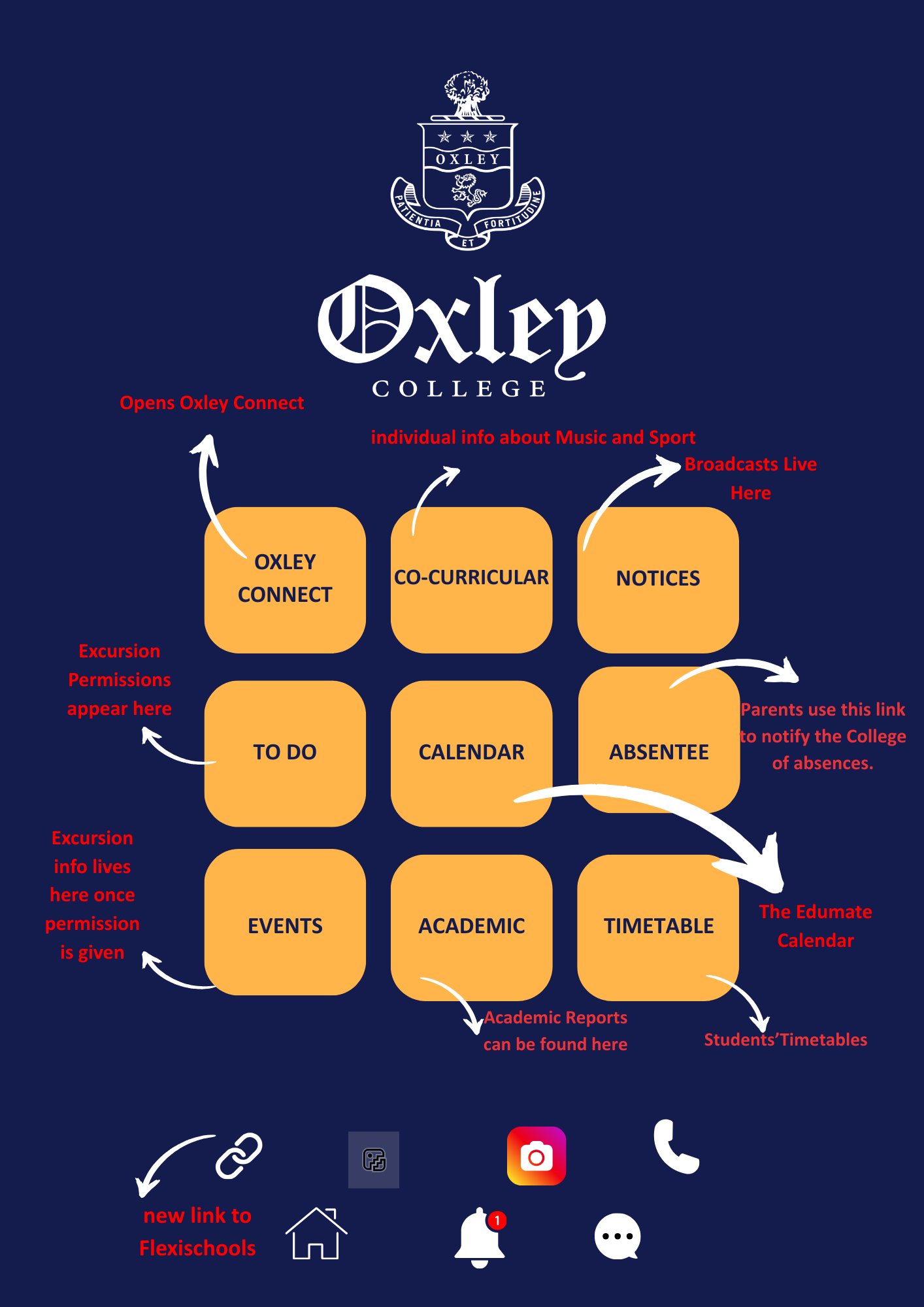
This is a modified calendar of events. Please see the Calendar icon on the Oxley App for the full College Calendar.

Week 1AThursday 29 JanuaryWelcome Day
First Day for all Year 7 & Year 11 students.
Friday 30 JanuaryTerm 1 starts for all students
Saturday 31 JanuaryISA Round 7
Week 2BMonday 2 FebruarySchool Photos – Junior School
Kindergarten Information Session
Tuesday 3 FebruarySchool Photos – Senior School
Year 1 Information Session
Year 2 Information Session
Year 7 Information Session
Year 11 Information Session
Wednesday 4 FebruaryYear 3 Information Session
Year 4 Information Session
Year 9 Information Session
Duke of Edinburgh’s Information Session
Thursday 5 FebruaryYear 7 Orientation Camp departs
Year 5 Information Session
Year 6 Information Session
Friday 6 FebruaryYear 7 Orientation Camp returns
Week 3ATuesday 10 FebruaryJunior School Swimming Carnival
Wednesday 11 FebruaryYear 12 Student Parent Teacher Interviews
Thursday 12 FebruaryP-12 Welcome Drinks
https://www.trybooking.com/DIFPQ
Week 4BTuesday 17 FebruaryP&F Meeting – 5.30pm, All Welcome
Thursday 19 FebruaryCentre for Ethics – Professor Joel Pearson
https://www.trybooking.com/DHSSC

School Photos

School Photos

School photos will take place on Monday 2 February and Tuesday 3 February. To order individual, class and family photos please got to www.advancedlife.com.au and enter the code 86P AZG PJ9. This should be done prior to the photo day. Family photos will take place during lunchtimes on Monday 2 and Tuesday 3 February, depending on student availability.

2026 Traffic Management Plan

2026 Traffic Management Plan

Oxley College Traffic Management Plan

Please follow the link above to familiarise yourself with the Traffic Management Plan.

Pick up times are:

Pre-K: 3.00pm

Kindergarten to Year 2: 3.05pm

Years 3 – 6: 3.15pm

Years 7 – 12: 3.25pm

Please do not arrive to the Junior School Turning Circle or the Senior School Pick Up Zone before your allocated time.

The Oxley App

The Oxley App

Student Use of Mobile Devices Policy

Student Use of Mobile Devices Policy

Oxley College’s Policy regarding Mobile Devices has changed. The new policy is as follows:

Years K-8

  1. Students below Year 9 are not permitted to bring smartphones to school or to any school-related events and activities. If a student below Year 9 is found in possession of a smartphone at school or at a school event, the device will be confiscated.
  2. Junior School students who bring a feature phone or smartwatch to school must hand it in to their class teacher each day. Students in Years 7 and 8 should place it in their locker for the duration of the school day.
  3. Students are not permitted to take mobile devices on school camps and excursions.
  4. Any exceptions to this policy need to be discussed with the relevant Head of School.

Years 9-12

  1. Students in Year 9 and above who bring a feature phone or smartphone to school must place it in their locker during the school day.
  2. Students in Years 9 and 10 who bring a smartwatch to school must place it in their locker during the school day.
  3. Unless otherwise instructed, students are not permitted to take mobile devices on school camps and excursions.
  4. Any exceptions to points 1-3 above are at the discretion of the Head of Senior School.

Parents/carers are encouraged to discuss the importance of this policy and its procedures with their children to foster understanding and cooperation.

The full Student Use of Mobile Devices Policy can be found by following this link: Student Use of Mobile Devices Policy

Medical Information

Medical Information

Student medical information should be updated regularly through the Oxley College Parent Portal. Full details on how to update your personal details, including your child’s medical information can be found by following this link: Parent Portal and App Information | Oxley College

If your child requires medication to be taken throughout the school day, please complete the form in the following link, print and hand in to The Clinic with the relevant student medication. Oxley-College-Parent-Request-to-Administer-Medication-Fillable.pdf

The following form is to be completed for students with high-risk medical needs e.g. anaphylaxis, severe asthma etc. Any queries please contact Nurse Bec via clinic@oxley.nsw.edu.au Individual Health Care Plan (IHCP)

If you have any questions regarding your child’s medical information, please contact Nurse Ella or Nurse Tanya via clinic@oxley.nsw.edu.au

Student Technology at Oxley

Student Technology at Oxley

From 2026 Oxley College is moving to a School Managed Device (SMD) model with Apple-based devices.  For years 6-12, the SMD model will comprise of a choice of either a school-owned and school-managed device, or a parent-supplied, school-managed device.

It is important to note that from 2028 onwards, all students (except for the current Year 9 2025 cohort, who will be in Year 12 in 2028) will have school-owned, or parent-supplied School Managed Devices.

Families were asked to choose from one of the following options for 2026.

Students who have chosen Option 1a, 1b, or 1c:

All school managed devices, both school-owned and parent-owned (that have been delivered to the school) will be available for students on their first day back.

If you have a parent-owned device that you wish to be school-managed and have not delivered to school yet, please contact the ICT department at studentonboarding@oxley.nsw.edu.au to arrange a delivery time.

Students who have chosen Option 2: BYOD:

Onboarding information will be sent out to parents via studentonboarding@oxley.nsw.edu.au. Please follow the onboarding steps on the Oxley College Onboarding website before Welcome Day. If you have any issues please contact the ICT Department at studentonboarding@oxley.nsw.edu.au.

Option 1: School Managed Device (either School-Owned, or Parent-Supplied)

Option 1(a): School-Owned Device

  • This is available to students in Years 6-12 2026 only.
  • Students will be provided with a school-owned Apple MacBook Air M4 with 16GB Ram and 256GB memory, or a school-owned iPad 11 (128GB). *iPad available to students in Year 6 only. 
  • Specific software (apps) will be installed on the device and will ensure year/age specific internet filters are active. Please note, whilst the device management internet filtering and software restrictions are active 24/7, the school will only monitor the devices during normal school hours.
  • Students will use their Oxley email address as their Apple ID and app downloads will be restricted to school-approved apps only.
  • A levy will be applied to manage these devices.  The levy will be added to school fees and is $480 per year for an iPad and $600 per year for a MacBook.
  • Repairs & Support – For School-Owned devices the student will drop the faulty device off at the Oxley Helpdesk. They will be given a new device, and this device will be associated with them. Oxley Helpdesk will then send the device to EduCom IT who will manage all Apple repairs end-to-end. Depending on how the device is broken, Oxley will invoice the parents for the physical repair cost under AppleCare+ pricing.
  • Devices will be available for collection at Welcome Day, Thursday 29 January 2026 or for existing students on Friday 30 January 2026.

Option 1(b): Parent-Supplied New Device

  • This is available to students in Years 6-12 2026 only.
  • Parents will need to purchase an Apple MacBook Air M4 with 16GB Ram and 256GB memory, or an iPad 11 (128GB). *iPad available to students in Year 6 only. 
  • Specific software (apps) will be installed on the device and will ensure year/age specific internet filters are active. Please note, whilst the device management internet filtering and software restrictions are active 24/7, the school will only monitor the devices during normal school hours.
  • Students will use their Oxley email address as their Apple ID and app downloads will be restricted to school-approved apps only.
  • Oxley recommends purchasing an Apple device from our Apple authorised reseller EduCom IT.  Please visit https://www.educomit.com.au/oxley for the specified devices. Devices purchased from EduCom IT will be directly entered into the Oxley School Managed Device (SMD) system.  Devices purchased through EduCom can also be delivered directly to Oxley College.  If you would like the device sent to Oxley, please include this in the notes section when you check out. 
  • There is no levy for this option.
  • Repairs & Support – Students can drop their devices off at the Oxley IT Helpdesk and be issued with a replacement device for the duration of the repair. EduCom IT will review the device and work directly with you, the parents to repair or replace, depending on warranty, AppleCare+ status, and the age of the device. Once repaired, the device will be returned to the school and the student will swap the devices back. Oxley highly recommends that families purchase AppleCare+ for Parent Supplied Devices, as this will significantly reduce repair costs. 

Option 1(c): Parent-Supplied Existing Device

  • This is available to students in Years 6-12 2026 only.
  • Parents will need to supply an Apple MacBook Air (M1-M5), or an iPad 11 (128GB). *iPad available to students in Year 6 only. 
  • This device will need to be factory reset in order to be entered into the Oxley School Managed Device (SMD) system.
  • Present the factory-reset device to the Oxley ICT department by 15 January 2026 to be uploaded with the specific software required.  If you require assistance resetting your device please contact the ICT Department, details below.
  • Specific software (apps) will be installed on the device and will ensure year/age specific internet filters are active. Please note, whilst the device management internet filtering and software restrictions are active 24/7, the school will only monitor the devices during normal school hours.
  • Students will use their Oxley email address as their Apple ID and app downloads will be restricted to school-approved apps only.
  • There is no levy for this option.
  • Repairs & Support – Parents can opt to have their device repaired by EduCom IT or an independent repairer.

Option 2: Parent supplied BYOD device

  • This allows students to bring their current device, and it will not be managed by the school.
    • If you wish to use an existing Apple device, the recommended specifications are:
      Apple MacBook Air with 16GB Ram and 256GB memory.
    • If you wish to use an existing PC device until 2028, the recommended specifications are: Windows 11 PC with 16GB Ram and 256GB memory.
  • BYOD devices will have firewall restrictions in place while on campus only.
  • From 2028, all students will be moved into Option 1.       

For more detailed information about Oxley’s move to School Managed Devices, please visit https://www.oxley.nsw.edu.au/senior-school/school-managed-devices-2

For help and support, please contact the ICT Department at studentonboarding@oxley.nsw.edu.au

The Oxley Shop

The Oxley Shop

Summer Holiday Trading Hours

Monday 19 January – Friday 23 January: 8.30am – 4.00pm

Tuesday 27 January – Friday 30 January: 8.30am – 4.00pm

Our online shop is also available for orders: Oxley Shop Online Store (company.site)

Warm regards

Nicky Moran
Oxley Shop

The Oxley Canteen

The Oxley Canteen

The Oxley College Canteen is committed to providing fresh, interesting, nutritious food for the entire school community. We are guided by the recommendations of the state government’s Healthy School Canteen Strategy: “Fresh Tastes at School”.

The majority of food for sale at the canteen is prepared and cooked on site. We use fresh vegetables and fruit, lean meat and chicken, free-range eggs and fresh local bakery products. We regularly provide vegetarian and gluten-free meals and do not use nuts or nut products in the canteen. Ongoing offerings for lunches include toasted panini, sandwiches, salads, soups, pastas.

Junior School students must bring their recess from home but may order their lunch from the canteen. There is currently no provision for K-6 students to purchase food across the counter at recess or lunchtime.

Senior School students may purchase items over the counter.

We are partnered with Flexischools who to provide an online ordering service for the whole school. Students in Years 7-12 are also issued with a Flexischools cashless card which can be used at the Canteen once it has been linked to a Flexischools account.

We encourage all parents to set up an account with Flexischools to experience the quick and easy way to order your child’s lunch. You can even order for the whole term and then cancel any days not required.

The first step is to register and create an online account. You will receive a confirmation email which then directs you to the Oxley College Canteen page. Set up your individual children’s details then go ahead and order. Orders must be received by 9.00am on the day. Similarly, cancellations must be made by 9.00am.

If your child has been issued with a student card you will need to link the card number to your account before it can be used at the canteen.

Ordering for Junior School students: 

  • Please use the Flexischools system
  • Lunch orders are returned to P-6 in crates and distributed by the classroom teacher.
  • Should your child’s lunch be spilled or otherwise rendered inedible, a replacement lunch will happily be supplied and you will be notified. Prompt payment is appreciated.

Ordering for Senior School students:

  • Please use the Flexischools system
  • Orders are collected from The Pavilion (The Oxley Canteen)

Welcome from the Parents’ & Friends’ Association

Welcome from the Parents’ & Friends’ Association

Welcome to the New School Year!

The P&F would also like to extend a warm welcome to all students, parents, and staff as we embark on another exciting school year. Whether you are returning or joining us for the first time, we are thrilled to have you as part of our school community.

I’d like to thank the following parents who have volunteered as Year Reps for 2026 , please reach out to them with any questions big or small and keep an eye out for year group related catch ups. 

Junior School 

Pre K: Clare Paterson, Alischa Herrmann

Kindy: Lucy Loneragan, Amy Moss, Danielle Hardy

Yr 1: El Settle, Bee Perkins, Kat Aleksandric

Yr 2: Emma Lawford, Cam Scott, Blythe Goring, Mark Godresse

Yr 3: Peach Robb, Amy McIver, Alix Trute

Yr 4: Sally Murphy Blunt, Alischa Herrmann, Lucy McGarva, Holly Barker

Yr 5: Laura Ruston, Nicola Willson, Teresa Fisher

Yr 6: Penny Jago-Pope, Alana Winn, Rebecca Goddard, Victoria Dalglish, Tanya Galwey

Senior School 

Year 7: Karen Bailey, Laura Horne (+2 tbc)

Year 8: Gen Norrie, Claire Talbot

Year 9: Helena Smith, Katrina Sparke, Nikki Sicari, Jess Rahme

Year 10: Gail Denington, Kate Moore, Kristy Curr, Sophie Smith

Year 11: Kirrily Zupp, Emma Sheezel, Beth Macdonald, Lisa Lawson

Year 12: Edwina Carter, Annabel Robertson, Sally Kean

Oxley’s community spirit is something we pride ourselves on and we encourage you to get involved, share your ideas, and join us in making this year a successful and enjoyable one. Our first P&F meeting for 2026 will be on Tuesday 17 February at 5.30pm .

In the meantime we look forward to seeing you at Welcome Drinks on Thursday 12 February at 6pm

Sincerely 

Amelia Goff
President, Oxley Parents’ & Friends’ Association